Beschreibung
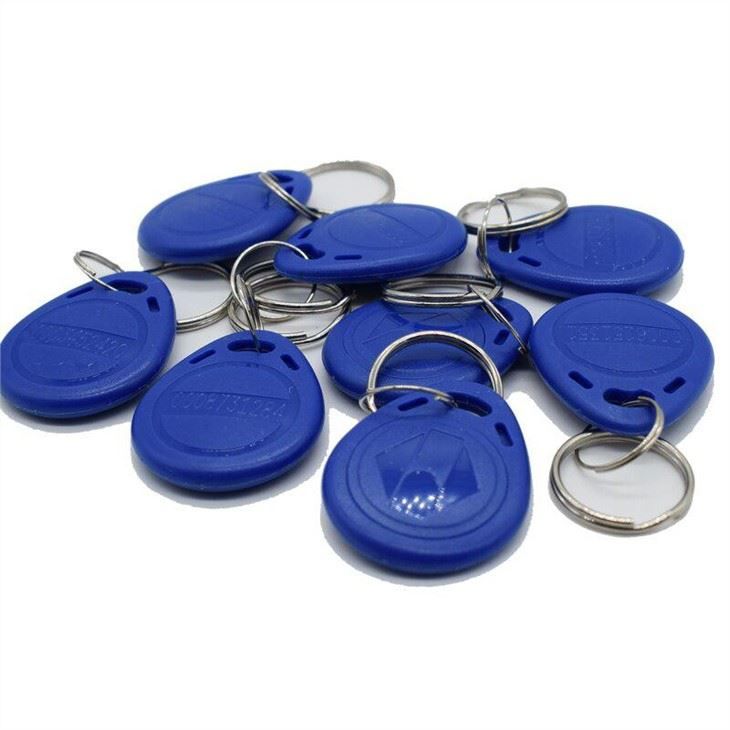
Duplicating an RFID fob involves reading the unique identifier (and sometimes other data) from an original fob and then writing that same information onto a blank, „rewritable“ RFID fob. This process is commonly referred to as „cloning“ or „copying.“
Here’s a detailed breakdown of how to duplicate an RFID fob, including crucial considerations:
1. Understand the Types of RFID Fobs
The ease and method of duplication heavily depend on the RFID technology used in the original fob:
-
Low Frequency (LF – 125 KHz):
- Common Chips: EM4100 (read-only), T5577 (rewritable/clonable), HID Prox.
- Duplication Ease: Generally the easiest to duplicate.
- Characteristics: Often used in older, simpler access control systems. They broadcast a unique ID, sometimes with a facility code. Most are unencrypted or use very basic, easily decodable encoding.
- Rewritable Blanks: T5577 chips are specifically designed to be reprogrammed to mimic various 125 KHz formats.
-
High Frequency (HF – 13.56 MHz / NFC):
- Common Chips: MIFARE Classic (1K, 4K), MIFARE DESFire, NTAG series (NTAG213, NTAG215, NTAG216), ISO 15693.
- Duplication Ease: Varies from easy to extremely difficult.
- Characteristics:
- NTAG series: These are simple NFC Forum Type 2 tags, often used for public NFC applications (like smart posters). They are generally easy to read and write (duplicate) using an NFC-enabled smartphone with the right app, or a simple HF copier, as they store data in an unencrypted NDEF format.
- MIFARE Classic: These tags are sector-based and use a proprietary encryption (Crypto-1) with keys for each sector. If the keys are default, known, or can be „cracked“ (e.g., using vulnerabilities like the „nested attack“ on older versions), they can be duplicated onto special „UID changeable“ or „CUID“ (Changeable UID) blank MIFARE Classic fobs. This often requires more advanced tools like a Proxmark3.
- MIFARE DESFire, HID iCLASS, SEOS: These are high-security chips that use strong, modern encryption (like AES) and mutual authentication. They are designed to be highly resistant to cloning by unauthorized parties. Duplicating these is typically impossible with consumer-grade or even semi-professional equipment without access to the system’s cryptographic keys.
2. Essential Tools for Duplication
-
RFID Copier/Duplicator Device: This is the core tool.
- Simple Handheld Copiers: Inexpensive (often $15-$50), battery-powered, and typically designed for 125 KHz (EM4100, T5577) fobs. Some might also handle basic 13.56 MHz NTAGs. They usually have „Read“ and „Write“ buttons.
- Advanced Desktop Readers/Writers (e.g., ACR122U): Connect to a computer via USB. With specific software, they can read/write NTAGs and sometimes manipulate MIFARE Classic (if keys are known or default).
- Specialized Multi-Frequency Tools (e.g., Proxmark3): More expensive ($100-$400+), complex, open-source, and require technical expertise. These are capable of identifying many fob types, performing advanced „cracking“ techniques on older encrypted fobs (like MIFARE Classic), and writing to a wide range of blank tags. This is often what professionals or hobbyists use for more challenging duplication tasks.
- Smartphone (for NFC/13.56MHz only): Many modern Android phones with NFC and apps like „NFC Tools“ or „NXP TagWriter“ can read and write to unencrypted 13.56 MHz tags (like NTAG series). Some can also read some data from MIFARE Classic, but writing often requires specialized „CUID“ blanks and specific apps (which may not be officially sanctioned).
-
Blank, Rewritable RFID Fobs/Cards:
- These are crucial. They must be compatible with the frequency and chip type of the original fob and capable of being written to.
- For 125 KHz, look for T5577 keyfobs or cards.
- For 13.56 MHz, look for UID changeable, CUID, or FUID MIFARE Classic compatible fobs/cards (for cloning MIFARE Classic) or generic rewritable NTAG stickers/fobs.
3. Step-by-Step Duplication Process (General)
This assumes you have a simple handheld copier and are dealing with a 125 KHz fob or a straightforward 13.56 MHz NFC tag.
- Power On the Copier: Ensure the device is fully charged or connected to power.
- Select „Read“ Mode: Most simple copiers have a dedicated „Read“ button or switch.
- Place Original Fob: Hold the original RFID fob firmly against the designated reading area of the copier.
- Initiate Read: Press the „Read“ button. The copier will typically emit a beep, flash an indicator light, or display the ID on an LCD screen if the read is successful.
- Remove Original Fob and Place Blank Fob: Take away the original fob and place a blank, compatible rewritable fob in the same reading area.
- Select „Write“ Mode: Switch the copier to „Write“ mode or press the „Write“ button.
- Initiate Write: Press the „Write“ button. The copier will transfer the captured data to the new fob, usually indicating success with a different beep or light.
- Test the Duplicated Fob: Crucially, test the newly copied fob on the actual access control reader or system it’s intended for. This is the only way to confirm successful duplication.
Important Ethical & Legal Considerations:
- Authorization is Paramount: It is highly recommended and often legally required to obtain permission from the property owner, building management, or system administrator before duplicating an RFID fob. Unauthorized duplication can compromise security, violate leases or terms of service, and may carry legal consequences (e.g., trespassing, theft of services).
- Security Risks: Duplicating fobs, especially those used for sensitive access, can create security vulnerabilities. If a cloned fob is lost or falls into the wrong hands, it can grant unauthorized access.
- System Knowledge: Many modern access control systems are designed to detect and prevent cloned fobs or can easily deactivate original fob IDs, rendering clones useless.
- Cost vs. Security: While a DIY copy might seem cheaper than ordering a legitimate replacement, consider the potential security implications and legal risks.
In summary, while duplicating RFID fobs is technically feasible for many common types, it’s essential to proceed with caution, understand the technology involved, and always ensure you have the necessary authorization.